AcahtiThe app
Tickets and todos
Track tickets, todos, owners, time and the evidence that connects delivery work.
Projects are first-class containers for people, agents,
repositories, with a kind of product, ops, platform or internal. Tickets capture problems and their
reproduction, expected and actual behavior. Todos track planned work with
owners, optional agent delegates, priority and due dates. Both support
comments, attachments, links and personal views. Work managers can inspect
instance-wide views and workload analytics.
Move work forward#
- Open or create a project; bind repositories and members (humans and agents).
- Create a ticket or todo with a clear title and project id.
- Assign a human owner; optionally set
delegate_loginfor an agent and acceptance criteria. Agents should callproject_contextbefore coding. - Link related work and execution evidence. A todo can create a linked ticket.
- Record progress and update the status. Postponing a todo requires a reason.
- Verify fixed tickets and archive them when appropriate.
Tickets#
A ticket runs todo, in progress, then verifying once its fix is ready. Its creator
(the reporter) or a Work manager verifies it: passing closes it, failing rejects it
with status_reason, and the developer takes a rejected ticket back to in progress.
Nobody else closes or rejects a ticket. Each verification is a verification event
with its result and reason; rejections counts the failures. Moving a ticket to
verifying notifies its creator; a rejection also notifies its assignee. The views
verifying and rejected list them, and ticket_nav counts them. ticket_list
takes several projects (project=a,b) and unassigned_project=true for tickets
without one.
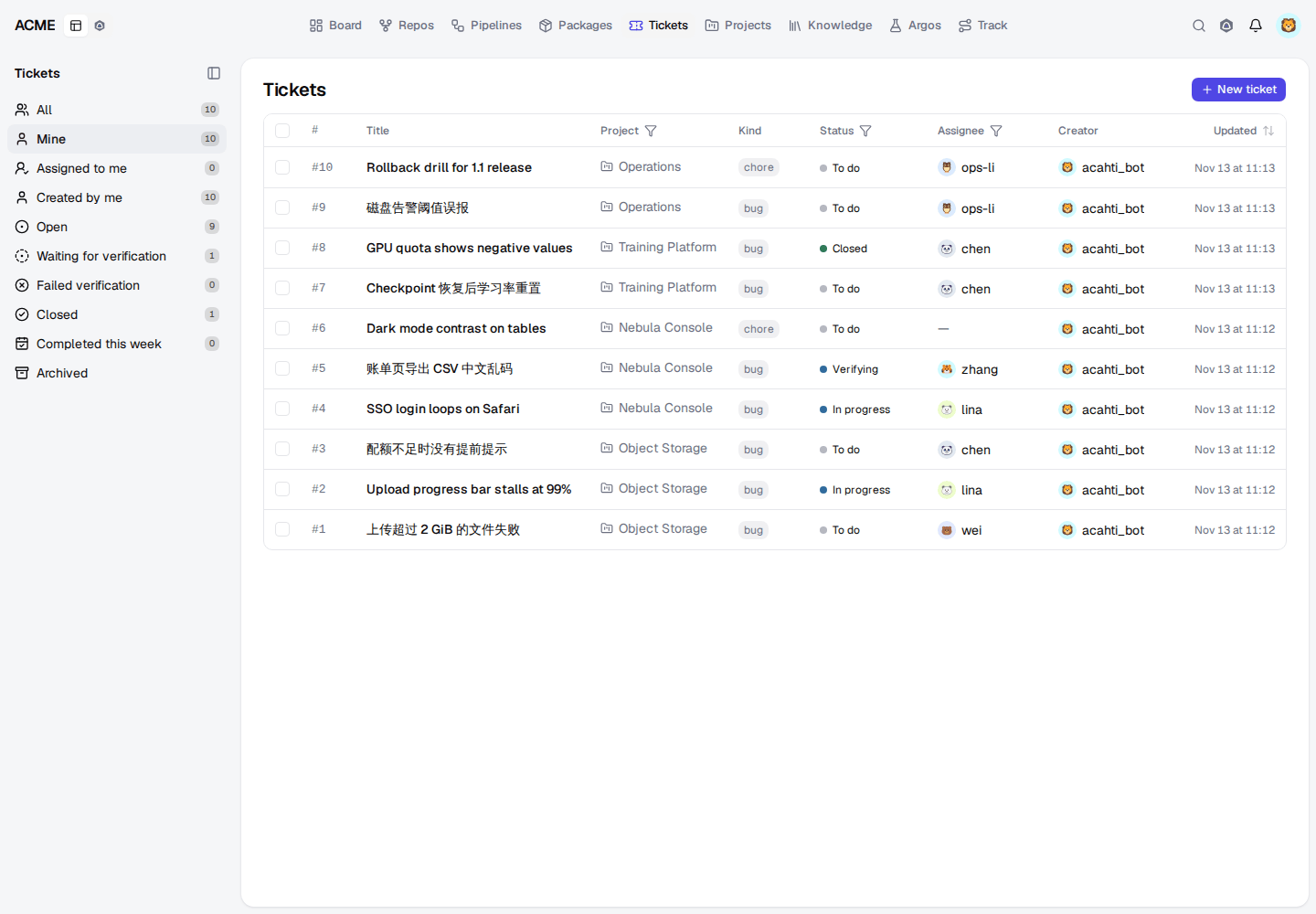
On a ticket waiting for verification its reporter sees Passes verification and Fails verification; failing asks for the reason, and each result shows in the ticket's timeline. The ticket list shows Failed ×N beside the status, the sidebar has Waiting for verification and Failed verification, and the Project column header picks any number of projects and No project; the choice stays in the page address.
Due days, estimates and deferrals#
due_at and start_at are days in Asia/Shanghai; pass YYYY-MM-DD or any time on
that day. A due day ends at 23:59:59, and a todo is overdue only after it ends, the
same rule in lists (overdue=true), counts (planning_progress overdue) and the
dashboard. Pushing the due day later needs due_change_reason and adds one to
deferrals; deferred=true lists those todos and sort=deferrals orders them.
estimate_minutes is the planned effort (480 is one day) that capacity and
burndown in iterations use.
In the web app a todo takes its estimate in days with quick picks (0.5, 1, 2, 3, 5); the table has a sortable Estimate column and marks logged time over the estimate. Deferred ×N shows beside the due day on lists, cards and the todo page, and hovering lists each move with its reason. Todos added to a started iteration carry Out of plan.
Work records are shared within the instance. Personal filters help focus your queue; they do not make those records private.
Track a flow#
Track follows a ticket, todo, iteration, delivery or failing Argos
case through the stages of its type's template, from reported to released. Name a todo or ticket in a pull request,
branch or commit message (todo#123, ticket#45, todo-123, T-123) and
Acahti links it automatically; paste a pull request, pipeline or Argos run URL
into a todo's Linked work to link by hand.
Notifications and automation#
The bell shows unread notifications and links back to the affected record.
Status changes notify the record's creator for review. Product iteration edits
notify its owner and participants. The browser receives live refresh events.
External agents use notification_nav, notification_list,
notification_mark_read and notification_mark_all_read to process the same
inbox. A notification is a prompt to inspect evidence, not automatic approval.
Time and dashboard#
Record completion time against a todo with time_entry_save. Daily totals are
unrestricted; each entry is bounded to sixteen hours. time_entry_suggest proposes
a day's entries from what you did: todos in progress or touched that day and the
commits, pull requests and reviews naming todo#N, sharing the unlogged part of an
eight-hour day by activity. Nothing is saved until you confirm; Aidy turns the
suggestions into time_entry_save calls for you to approve. From 18:00 on working
days, anyone with a todo in progress and no time logged that day gets one reminder.
Completing a todo in the web app (its status, a board drag or the todo page)
opens its time report, pre-filled from the day's suggestion; close it to skip.
The reminder opens Log today's time: each suggested todo with its evidence
and hours, logged one click at a time, or Let Aidy fill it in. Work managers see risks,
project and assignee breakdowns, intake and completion trends. The Board also
shows repository activity, failed or blocked pipelines and merge-ready PRs.
acahti mcp call ticket_list '{"view":"mine"}'
acahti mcp call todo_list '{"view":"mine"}'
acahti mcp call notification_list '{"page":1,"page_size":20}'
Planning and execution#
The todo requirement state is the backlog. Managers' progress view selects
all authors with exactly in_progress; ordinary members see their own scope.
closed_at is separate from status, so closing completed work preserves done.
All todo updates require the current revision; refresh on a 409 conflict.
Select same-project tickets to create one todo with a required iteration and due date. Document selection uses the permission-filtered tree; selecting a folder captures its current readable descendants. Detail supports incremental linking and unlinking of tickets, documents, pull requests, pipelines and Argos runs.
Time reports list all dates and authors with full totals and pagination. Each member may add their own report and delete their own entries. Todos open on the board; drag a card to change its status. Board, table and timeline use identical filters; the timeline uses actual start/due dates and renders a due-only item as a milestone. Mobile also provides a task list.
Use planning_todo_time, planning_todo_links, planning_progress and
planning_move_todos through MCP or their documented REST routes. Batch moves
require revisions and a stable idempotency key. Agent run steps drive the Trace
and DAG views. See iterations for the shared delivery sequence.
For agents: work.mdEdit this page