AcahtiThe app
Pipelines
Follow every run across the organization, and write CI and CD in .acahti/pipelines/ with official pipes and secrets kept out of git.
A pipeline is one run. Each YAML file in .acahti/pipelines/ is a job in that run, and each job has named steps. A pipe is an official, reusable step: pipe: <name>@v1 with inputs under with:.
Before the Runner starts a job, the gateway expands it: pipe: becomes a call to acahti-pipe <name>, mapped secrets become step environment, and every step receives the run's Acahti identity: ACAHTI_USER, ACAHTI_TOKEN, ACAHTI_ROOT_URL and ACAHTI_ORG. That identity is the Acahti account of the head commit's author (falling back to the account that started the run); a step's own environment: value wins. The Runner only ever sees expanded YAML.
The Pipelines page#
Pipelines in the header lists runs across every repository you can read.
Counts of running, failed, awaiting-approval and succeeded runs lead the page;
filter by status, team and repository. Rerun a run, or approve a gated deploy
when you have push access (deploy_approve). A repository's own Pipelines
tab adds its success rate, median duration and a chart of run durations.
A run's page shows its trigger (push, tag, pull request, schedule or manual), the runner, and its jobs as a graph or a timeline. Logs stream live; follow the latest line, wrap lines or copy a log.
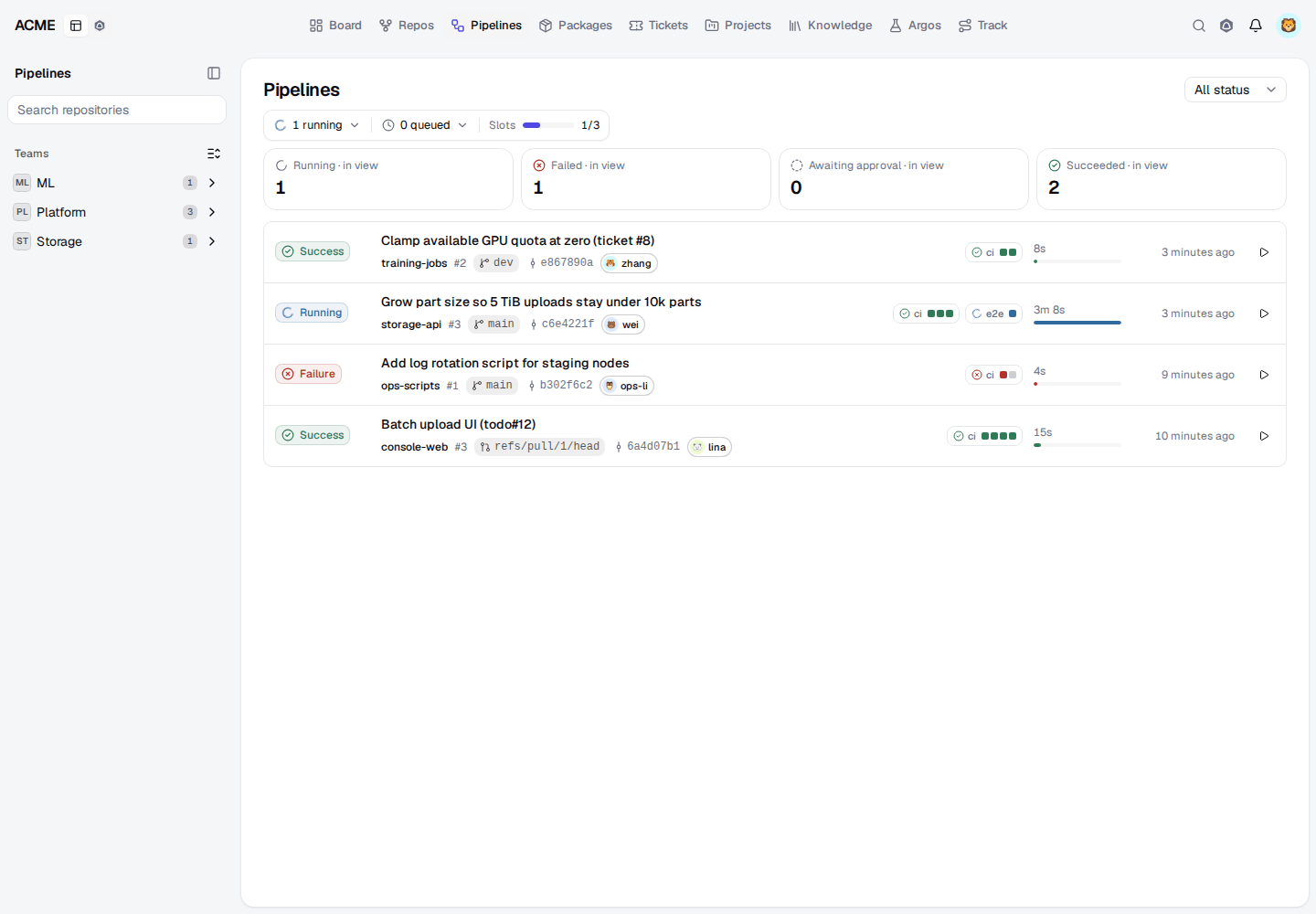
Writing a job#
A step is either pipe: with with:, or plain commands: for one-offs. when, depends_on, and labels pass through unchanged. Do not vendor helper scripts into the repository and do not write uses:.
steps:
  test:
    image: node:22
    commands:
      - npm ci
      - npm test
Jobs order by depends_on between files, parents first. If a job declares concurrency:, its group is scoped to the repository, so group: deploy in two repositories does not serialize them. Leave concurrency out to run freely.
In commands:, write $VAR for step environment. ${VAR} is interpolated before the shell starts and is empty unless it is job context, such as ${CI_COMMIT_SHA} or ${CI_COMMIT_TAG}.
Trigger runs with git push, a tag, or a pull request. Git tags are vX.Y.Z; image tags drop the v (${CI_COMMIT_TAG#v}).
Secrets#
Pipeline secrets are credentials for systems outside Acahti: registries, clusters, object storage. Admins add them in the web app (Admin → Org secrets, or a repository's Secrets page) or with secret_put. Names are lowercase snake_case. Values are never listed or returned.
A step opts in. List a secret when its name is the variable the pipe wants; map it when the names differ:
secrets:
  KUBECONFIG: kubeconfig_prod
  DOCKER_USERNAME: registry_username
  DOCKER_PASSWORD: registry_password
Do not put file paths to credentials in with:. Acahti's own npm and PyPI registries use the run's identity, so never create a token secret for them.
Official pipes#
docker-build#
Build images with BuildKit and push them, or build cache-only for CI.
| Input | Required | Description |
|---|---|---|
images |
yes | One image per line. First field is the primary tag. Optional KEY=VAL: also extra tags (comma-separated), context (default .), file (Dockerfile), anything else is --build-arg. Job identity is written as BuildKit secrets id=npmrc and id=netrc (HTTP Basic from ACAHTI_USER / ACAHTI_TOKEN). Dockerfiles mount id=npmrc at /root/.npmrc and id=netrc at /root/.netrc. Default --network=host on buildx. CODEUP_NETRC, when set, is passed as id=codeup_netrc. |
push |
true (default) is buildx --push; false is --output=type=cacheonly (CI) | |
network |
docker buildx --network (default host) | |
builder |
buildx builder name (default acahti, docker-container + host network) |
docker-gc#
Bound shared BuildKit cache and report disk pressure. Runs every 15 minutes on the Runner.
docker-login#
Log in to a container registry for later steps in the job. Secret DOCKER_PASSWORD.
| Input | Required | Description |
|---|---|---|
registry |
yes | Registry hostname. An http:// prefix is the same as http: true. |
http |
true if the registry is HTTP/insecure (BuildKit). Default false (HTTPS). | |
username |
Registry user; password is DOCKER_PASSWORD (or DOCKER_USERNAME + DOCKER_PASSWORD) |
helm#
Install or upgrade a Helm release. Secret KUBECONFIG holds the kubeconfig document.
| Input | Required | Description |
|---|---|---|
release |
yes | |
namespace |
yes | |
chart |
Chart path relative to the workspace (default chart) | |
files |
Extra -f values files, one per line, relative to the workspace | |
set |
Extra --set lines (foo=bar or --set foo=bar) | |
timeout |
Helm --timeout (default 5m) | |
take_ownership |
true to pass --take-ownership | |
jump |
SSH host, reachable from the Runner, that runs helm when the cluster API is private |
npm-publish-acahti#
Build an npm package and publish it to this org's Acahti registry.
| Input | Required | Description |
|---|---|---|
path |
yes | Package directory (package.json). Installs, builds, packs, and PUTs to this Acahti org's npm. |
image |
Node image (default node:22-alpine). Private registry images need a prior docker-login. |
oci-gc#
Prune old tags from OCI repositories, keeping latest and the newest few.
| Input | Required | Description |
|---|---|---|
repos |
yes | OCI repositories to prune (no tag), one per line |
keep |
Non-latest tags to keep (default 2). latest is always kept. |
oss-put#
Upload files to Alibaba Cloud OSS. Secrets OSS_ACCESS_KEY_ID and OSS_ACCESS_KEY_SECRET.
| Input | Required | Description |
|---|---|---|
endpoint |
yes | |
bucket |
yes | |
prefix |
yes | Object key prefix (no oss://) |
files |
yes | Local files to upload, one per line (workspace-relative) |
pypi-publish-acahti#
Build a Python package and publish it to this org's Acahti registry.
| Input | Required | Description |
|---|---|---|
path |
Directory with pyproject.toml (default .). Builds and PUTs to this Acahti org's PyPI. | |
image |
Python image (default python:3.12-slim-bookworm). uv is installed if missing. Private registry images need a prior docker-login. |
uv#
Run commands in a job-local Python environment with uv.
| Input | Required | Description |
|---|---|---|
project |
Directory with pyproject.toml (default .) | |
run |
yes | One command per line; each is uv run --project |
wait-http#
Wait until URLs stop answering 502, 503, 504, or nothing.
| Input | Required | Description |
|---|---|---|
urls |
yes | URLs to poll, newline or semicolon separated |
timeout |
Seconds to wait (default 180) | |
user_agent |
User-Agent header for the probes |
Examples#
CI that builds an image without pushing it:
steps:
  build:
    pipe: docker-build@v1
    with:
      push: false
      images: |
        app:${CI_COMMIT_SHA}
CD that builds, deploys, and prunes old tags, one deploy at a time:
concurrency:
  limit: 1
  group: deploy
steps:
  login:
    pipe: docker-login@v1
    with:
      registry: registry.example.com
    secrets:
      DOCKER_USERNAME: registry_username
      DOCKER_PASSWORD: registry_password
  build:
    depends_on: [login]
    pipe: docker-build@v1
    with:
      images: |
        registry.example.com/app:${CI_COMMIT_SHA} also=registry.example.com/app:latest
  deploy:
    depends_on: [build]
    pipe: helm@v1
    with:
      release: app
      namespace: default
      files: |
        chart/values.yaml
      set: |
        image.tag=${CI_COMMIT_SHA}
    secrets:
      KUBECONFIG: kubeconfig_prod
  gc:
    depends_on: [deploy]
    pipe: oci-gc@v1
    with:
      repos: |
        registry.example.com/app
Publish a package to the org's registry on a tag:
when:
  event: tag
steps:
  publish:
    pipe: pypi-publish-acahti@v1
End-to-end tests after a deploy job named cd:
depends_on: [cd]
steps:
  e2e:
    pipe: uv@v1
    with:
      run: |
        argos run all --env bj-test --dash
The step runs with the run's ACAHTI_ROOT_URL and ACAHTI_TOKEN, so --dash streams the run to Argos without a secret. When a job or one of its steps has a name containing e2e or argos, the pipeline page links the run the CLI reports (argos <sid>) as Argos.
Link pipelines to work#
When a pipeline's commit message, branch or pull request title names a todo or ticket (todo#123, ticket#45, todo-123, todo/123, ticket/45, T-123), Acahti links the pipeline, and the pull request it ran for, to that item. A pull request is also linked by its own title, body and head branch. The pipeline then appears in the item's Track flow under Build, and the pull request under Review.
For agents: pipelines.mdEdit this page