AcahtiThe app
Track
Follow a ticket, todo, iteration, delivery or failing Argos case from report to release across pull requests, pipelines and Argos runs.
Track follows one piece of work from the report to the release. It joins the records Acahti already keeps: tickets and todos, the pull requests, pipelines, Argos runs and documents linked to them, the iteration, its deliveries and their tag pipelines. A failing Argos case is followed the same way, from its first failing run to the release of the fix.
Stages#
Track knows eight stages, in this order:
| Stage | Evidence |
|---|---|
| Reported | A ticket was created; one opened from an Argos run also shows that run |
| Planned | A todo was created, or the iteration was planned; linked documents appear here |
| In progress | A todo is in progress or blocked; done when every live todo is done |
| Review | A linked pull request is open, merged, or closed without merging (failed) |
| Build | A linked pipeline is running, passed or failed |
| Argos | A linked Argos run is running, passed or failed |
| Delivered | The iteration's deliveries and their tag pipelines |
| Released | The iteration was released, or the ticket was closed or is waiting for verification |
A flow does not show all eight. It follows the template of its type, and also shows any other stage it has evidence for, so a pull request linked to an ops todo still appears under Review:
| Type | Follows | Built-in stages |
|---|---|---|
bug |
Tickets of kind bug | Reported, Triaged (planned), Fixing (in progress), Review, Build, Verified (Argos), Released |
feature |
Tickets of kind feature | Reported, Planned, In progress, Review, Build, Delivered, Released |
todo |
Todos | Planned, In progress, Review, Build, Delivered, Released |
ops |
Todos of an ops project, chore tickets | Planned, In progress |
argos_case |
Argos cases | Failing (reported), Ticketed (planned), Fixing (in progress), Green again (Argos) |
iteration |
Iterations and deliveries | Planned, In progress, Review, Build, Argos, Delivered, Released |
Work managers change a type's template: which stages it expects and, if wanted, a label that replaces a stage's name. Stages always run in the order above. A single flow can be adjusted where reality differs: follow another type's template, add stages, or skip stages (a skipped stage stays hidden even with evidence; its records remain on the flow). Work managers adjust any flow; the assignee, delegate or creator of a todo or ticket, and the owner of an iteration, adjust their own.
Each stage is done, current, upcoming, failed or skipped.
The current stage is the furthest failed stage, else the furthest active one,
else the stage after the furthest finished one. Earlier stages without evidence
are skipped, and a cancelled flow skips what it never reached. An unfinished
flow reports stuck_since, the time of its last transition.
Follow one item#
Todo and ticket pages show a Track card: the stage rail, then a timeline
of every stage with when it was reached, by whom, how long it took (or how long
the flow has sat there), and the pull requests, pipelines, Argos runs,
deliveries and other records behind it, each linking to its page. The card
names the flow's type and marks an adjusted flow. Iteration pages show the
rail; a delivery shows its own flow. An Argos case's flow shows in its Argos
case view (/argos/cases?case=<case id>). The flow follows the reader's permissions:
repository objects follow repository visibility, restricted documents stay
hidden, and every member sees Argos runs.
A pull request page shows its own lifecycle: opened, checks, ready to merge, then merged or closed.
See every open flow#
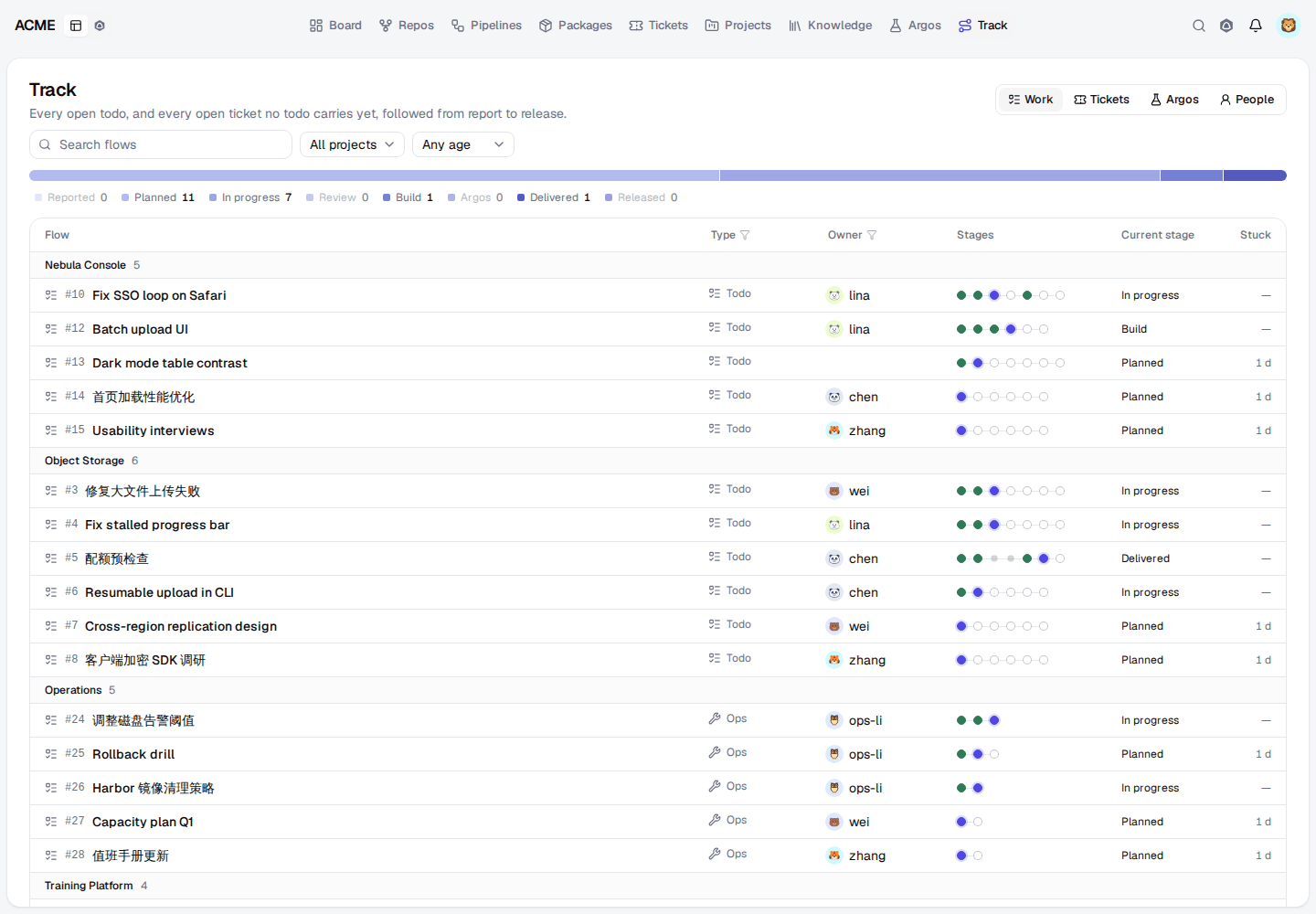
Open Track in the header. Three views list open flows; the view is kept in
the page address (/track?view=tickets):
| View | Lists | Grouped by | Filters |
|---|---|---|---|
| Work | Open todos, and open tickets that no todo carries | Project | Project, type, owner, stuck |
| Tickets | Every open ticket, including those todos carry and tickets waiting for verification until they are closed | Project | Project, type, owner, stuck |
| Argos | Argos cases failing now, or passing again after a failure in the last 14 days | Pack and group | Pack, group, environment, owner, stuck |
Filter by type and owner from the table's column headers. Each row shows its own stages, as its type's template and its adjustment give them. The stage summary counts flows by their current stage; select a stage to show only those flows. Search by title. Flows without activity for more than three days show how long they have been stuck. Select a row to open its todo or ticket page, or the Argos case view. The Argos view says so when Argos cannot be read.
Follow one person#
The People view (/track?view=people&login=wei&days=7) shows what one
person did over the last 7, 14 or 30 days: todos and tickets they moved,
time logged, deliveries, commits pushed, pull requests opened and merged,
reviews, tags, and pipelines run, failed and fixed (a passing run after a
failure on the same branch). Counts come first, then the same counts per
project and repository, then a timeline that links each record. Work events
come from Work, pull requests, pushes, reviews and tags from the person's
repository activity read as you (so private repositories stay hidden), and
pipelines from Acahti's pipeline index. You see your own activity; Work
managers see anyone's.
Flows already gather repository evidence: a pull request (title, body or head
branch) or pipeline (commit message, branch or pull request title) that names a
todo or ticket (todo#123, ticket#45, todo-123, todo/123, ticket/45,
T-123) is linked to it, and a delivery's tag pipelines
show under Delivered.
Argos cases#
A case's flow is read from built-in Argos: its newest result, its recent failing results and the runs they came from, and the tickets opened from the case (by case, or by one of its failing runs) with their todos.
| Stage | Evidence |
|---|---|
| Reported | The first failing run seen in the last 14 days, and the case |
| Planned | A ticket opened from the case, and the todos that carry it |
| In progress, Review, Build | Those todos and their pull requests and pipelines, as for any todo |
| Argos | The case's newest result once the fix is planned: failed, or done when it passes |
| Delivered, Released | The todos' iteration and deliveries; the ticket closed or waiting for verification |
Failures before a ticket exists repeat the report, so a failing case with no ticket waits at Planned. A case passing again with no open ticket or todo has finished at Argos. Failures are taken from the Argos overview, which keeps the 50 newest failing results.
Link pull requests, pipelines and runs#
Name a todo or ticket in a pull request title, body or head branch, or in a
commit message, and Acahti links it when the pull request event or pipeline
arrives. References are case-insensitive and may follow fixes, closes or
refs: todo#123 and ticket#45 anywhere, branch forms todo-123,
todo/123, ticket-45 and ticket/45, and T-123 for a todo. A bare #123
is a pull request number and is not read. Only existing todos and unarchived
tickets are linked, once each.
To link by hand, paste a pull request, pipeline or Argos run URL into
Linked work on a todo. Agents use planning_todo_links: pull and
pipeline take to_key owner/repo#n, argos takes the run id. You must be
able to read the repository or run. Replacing a todo's ticket and document
links keeps these.
Agent access#
acahti mcp call track_get '{"type":"todo","id":"123"}'
acahti mcp call track_list '{"view":"tickets","project":"turbomesh","stuck_days":7}'
acahti mcp call planning_todo_links '{"id":123,"revision":4,"add":[{"to_type":"pull","to_key":"acme/api#42"}]}'
acahti mcp call track_template_list '{}'
acahti mcp call track_template_update '{"type":"bug","stages":[{"key":"reported"},{"key":"planned","label":"Triaged"},{"key":"in_progress"},{"key":"review"},{"key":"released"}]}'
acahti mcp call track_flow_update '{"type":"todo","id":"123","skip":["review","build"]}'
acahti mcp call track_activity '{"login":"wei","days":7}'
acahti track list --view tickets --project turbomesh --stuck-days 7
acahti track list --view argos
acahti track view ticket 45
acahti track view argos_case nebula.upload
acahti track templates
acahti track template set bug --stages reported,planned=Triaged,in_progress,review,released
acahti track template reset bug
acahti track flow todo 123 --skip review,build
acahti track flow todo 123 --clear
acahti track activity --login wei --days 7
track_get (GET /work/track/{type}/{id}) takes a type of ticket, todo,
iteration, delivery or argos_case and a string id: the record number,
or the Argos case id. It returns the root (kind, string id, title, url), its
type, its override when adjusted (template, add, skip, updated_by,
updated_at), the flow's stages (key, label when the template renames it,
state, at, actor, nodes), the linked nodes and edges, the current stage
and stuck_since. track_list (GET /work/track) takes view (work,
tickets or argos), project and owner (work and tickets), pack, group
and env (argos), stuck_days, page and page_size. It returns items,
total and unavailable, which names argos when Argos cannot be read. Each
item has its root, type, group (id and name: the project, or the case's pack and
group), owner, stage states, current and stuck_since; Argos items add
argos with pack, group, env and the newest status; a root's url is
its page (/argos/cases?case=<id> for an Argos case). The browser reads the
same operations at /ui/track and /ui/track/{type}/{id}.
track_template_list (GET /work/track-templates) returns each type's
stages, its builtin stages, customized, and stage_keys with the
evidence each stage reads. track_template_update (PUT /work/track-templates/{type}) replaces a type's stages and
track_template_reset (DELETE) restores the built-in ones; both need a Work
manager. track_flow_update (PUT /work/track/{type}/{id}/flow) takes
template, add and skip, replaces the flow's previous adjustment (none of
them clears it) and returns the flow. Agents such as Aidy change templates and
flows through these operations.
track_activity (GET /work/track/activity) takes login (default you),
days (1 to 31, default 7) and until (YYYY-MM-DD, default today, Asia/Shanghai),
page and page_size. It returns login, since, until, counts
(todos, tickets, minutes, deliveries, commits, pulls_opened,
pulls_merged, reviews, tags, pipelines, pipelines_failed,
pipelines_fixed), groups (per project or repository: kind, id, name,
counts, total), the page of items (at, kind, action, ref,
title, url, project or repo, status, count, minutes), total,
has_more and unavailable (repos when repository activity cannot be read).
For agents: track.mdEdit this page