DocsProduct workspace
Aidy and global search
Search the workspace, and ask Aidy to find, explain or change things, with your confirmation before any write.
Search from the header: on wide screens the search field sits beside the
icons, and on narrower ones the magnifying glass opens it. Ctrl/Cmd+K focuses
or opens it from anywhere. With an empty query the palette offers recent
searches, suggested views (your open todos, tickets assigned to you, failed or
blocked pipelines, flows stuck for more than three days and failing Argos
cases) and Go to for each section. Type to search shared Work records,
Argos registered cases (test, opening the case's source) and runs (argos,
opening the run), and the repository, pull request, pipeline and package
records available to your account; Search in limits results to one kind of
record. Enter opens the selected hit, and Ctrl/Cmd+Enter hands the query to
Aidy. Installed plugins can contribute search results through their read-only
<plugin>_search operation. The full search page adds scope and state
filters for tickets and todos (for example mine + open).
Ask Aidy#
The Acahti mark in the header opens the sidecar, a panel beside the page that you can resize. It has two tabs: Aidy and Messages (your chats with people). The header badge counts unread chats, mentions and an Aidy reply you have not seen. Switch the header to Agent to make the sidecar the main surface with Aidy expanded, and back to Dashboard to return to the page. The browser remembers whether the sidecar is open, its width, the mode, the tab and the conversation on each tab, so a reload puts everything back.
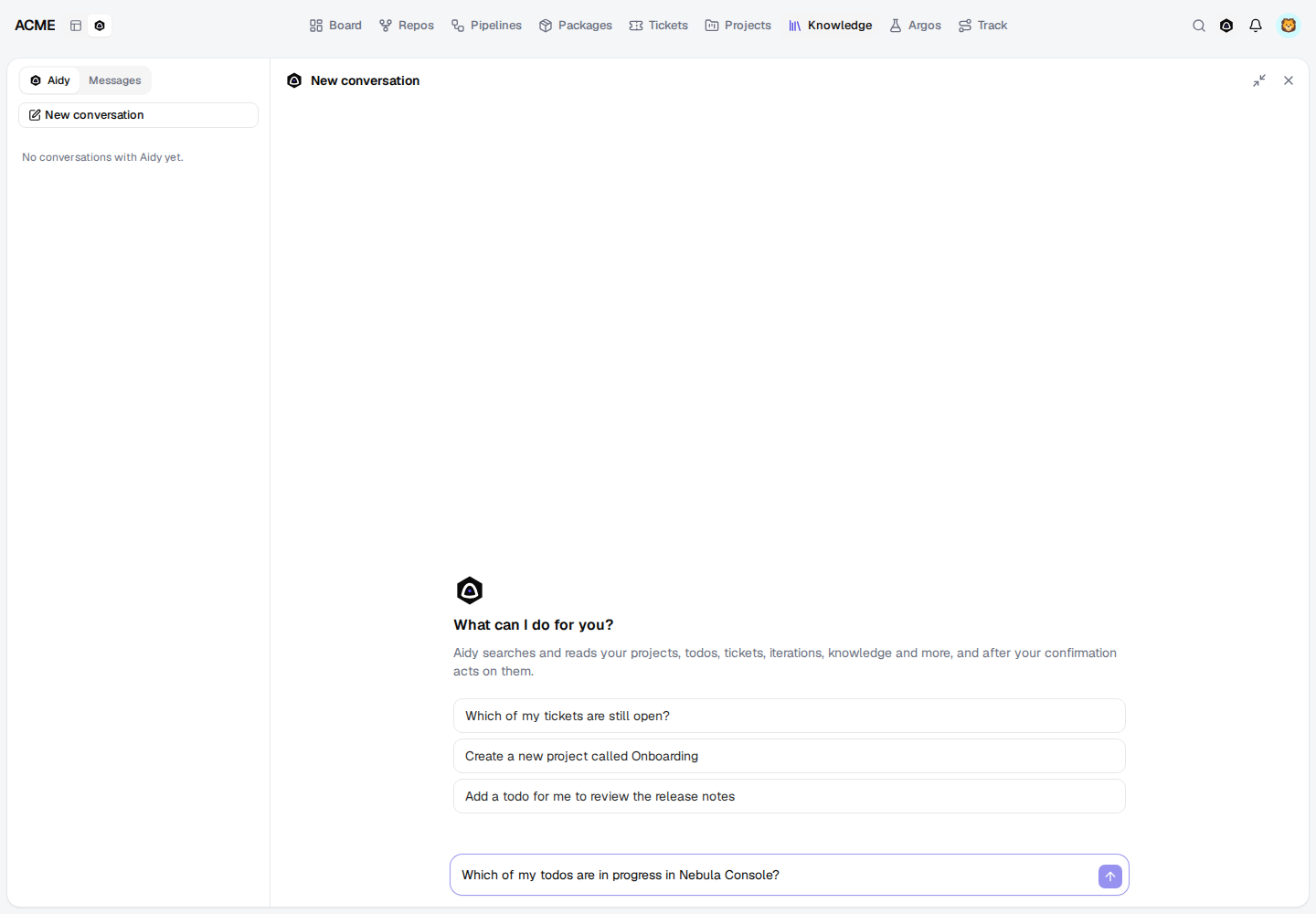
Aidy keeps your conversations on the server. New conversation starts one; History lists earlier ones, newest first, to reopen, rename or delete. The CLI and MCP see the same conversations.
Ask a question or give an instruction, for example:
- Which of my tickets are still open?
- 创建一个 Star Map 新项目
- 给 TurboMesh 建一个 todo:写 1.3 发布说明
- 把 #311 指给 lipeiyang
- Open the TurboMesh iterations.
Aidy is an agent on the configured model. It sees the operations you may call through MCP (the same catalog, permissions and plugin grants) and decides whether to search, read records or act:
- Reads (search, lists, records, pipeline logs…) run at once; the reply shows each lookup as a collapsible activity line.
- Writes wait for you. Aidy shows a card with the operation and its exact arguments, and nothing runs until you choose Confirm; Cancel drops it. Writes that may overwrite or remove existing data (updates, deletions, archiving, merges, permission changes) are flagged Destructive. Asking something new instead of deciding cancels the waiting write.
- Open a page: when you ask to open or show something, Aidy opens it on the left (returning from Agent to Dashboard) on product routes such as tickets, todos, projects, knowledge, repositories, pipelines, packages, Track and Argos.
A confirmed write runs as you, so it fails exactly where it would fail in MCP. Aidy never offers its own settings, setting secret values, creating members (which returns a one-time password) or publishing packages from a URL; use MCP or the CLI for those. Each reply runs at most eight model rounds and sixteen operations, and Aidy reads only the start of a long result. Answers link the records they rely on, and the sources they cite are listed under the reply. Tool results are treated as data, never as instructions.
Planning with Aidy#
Planning pages hand their question to Aidy, which reads the same numbers you see
(planning_brief) and proposes changes for you to confirm:
- Write an update (project) and Ask Aidy (iteration): a status update with health (on track, at risk or off track) and its evidence, progress, risks and scope changes with links, load against capacity, and next steps.
- Let Aidy propose when releasing or cancelling an iteration: one
iteration_closethat carries each unfinished todo, with a reason for any kept. - Let Aidy draft it in Submit delivery:
delivery_draft, then a changelog grouped into features and fixes, shown before anydelivery_submit. - Let Aidy fill it in in Log today's time:
time_entry_suggest, then onetime_entry_saveper entry with its evidence.
Ask in your own words too: "estimate the todos of 1.17", "what changed in 1.17's scope since it started", "which of my todos are overdue".
Configure the backbone#
An organization administrator opens Admin → Aidy settings. The default model
is qwen-flash and the default endpoint is DashScope's OpenAI-compatible API.
Set the API endpoint, model and API key, and enable model answers. The endpoint
must use HTTPS. Keys are encrypted at rest using the instance's durable session
secret and never returned by the settings API. Leaving the key field unchanged
keeps the existing key. Operators can also supply ACAHTI_AIDY_API_KEY.
Aidy calls the endpoint's chat completions with function calling (tools),
streaming, so the model must support tool calls; qwen-flash does. Without a
configured model, Aidy returns the shared search's hits for the question as
sources with configured: false. Global search works independently.
Agent access#
CLI, MCP and the sidecar reach the same conversations and the same agent.
acahti aidy ask --question "创建一个 Star Map 新项目"        # starts a conversation
acahti aidy ask --question "也加上 lipeiyang" --conversation 12
acahti aidy confirm 12 --call call_ab12            # approve the pending write
acahti aidy confirm 12 --call call_ab12 --cancel   # or cancel it
acahti aidy list
acahti aidy view 12
acahti aidy rename 12 --title "Star Map"
acahti aidy delete 12
acahti aidy settings
acahti mcp call aidy_ask '{"question":"Which of my tickets are still open?"}'
aidy_ask returns conversation, answer, tools (operations that ran),
pending (writes waiting for aidy_confirm with their id as call_id),
navigate, cited sources, model and configured. aidy_confirm runs or cancels the
pending write and returns the rest of the reply in the same shape.
aidy_conversation_list, aidy_conversation_get, aidy_conversation_update
and aidy_conversation_delete manage history. An agent that holds the catalog
itself may skip Aidy and call the operations directly.
aidy_configure / acahti aidy configure --body-file - requires organization
administrator privileges. Supply secret arguments on stdin, never in a command
line or shared document.
For agents: aidy.mdEdit this page